Instagram is the most popular social media platform in the world. It is used daily by people to share photos, videos, personal updates, business news, and stories. One question that continues to be asked online is: Do Instagram notifications notify you when you screenshot content?
People screenshot Instagram posts in order to save important messages, travel ideas, tutorials, cricket highlights or shopping offers. Privacy concerns have led some users to wonder if Instagram notifies the other user when screenshots are taken.
Instagram doesn’t notify screenshots for most cases. There are some exceptions that users should be aware of. Understanding Instagram’s privacy rules will help users to avoid confusion and make the most of Instagram.
Understand Instagram screenshot notifications
Instagram has made several updates to its privacy policies over the years. Instagram’s story screenshot notifications were briefly tested by older users. This feature caused confusion, as many users believed that every screenshot would trigger an alert. Instagram sends notifications only in certain situations, such as when content disappears. Regular screenshots are usually private.
Users often screenshot content for a variety of reasons, including
- Save educational information
- Keeping shopping deals
- Recording business details
- Travel tips for saving money
- Capturing sport updates
- Recipes and tutorials can be stored on your computer
Instagram has limited notifications because screenshots have become a common part of social media use.
Instagram Screenshot Notification Comparison Table
Instagram FeatureScreenshot Notification Sent?Notes
Regular PostsNo,Included are photos, captions and carousel postings
| Storys | No, | The story owner cannot view screenshots |
| Reels | No, | The creators are not informed |
| Profile Pages | No, | Included are bios and profile pictures |
| Regular DMs | No, | Text messages are private |
| Vanish Mode Chats | Yes, | Screenshot alerts are displayed in chat |
| Pictures and Videos that Disappear | Yes, | Notifications are usually sent to the sender |
| Highlights | No, | Screenshots are private |
| Live Video | No, | The screen recording is private. |
Instagram notifies you when you post a screenshot?
No. Instagram does not alert users when someone screenshots an ordinary post.
The following applies:
- Single photo posts
- Carousel posts
- Captions
- Comment
- Shopping Posts
- Posts about public accounts
- Viewing private posts is already permitted for users.
Every day, people screenshot posts without the account owner’s knowledge. Fashion pages, sporting content, technology tutorials and beauty tips are all common examples. Instagram is also heavily used by businesses in the Emirates for digital marketing. Customers often screenshot menus and product prices to review later.
Screenshots of Instagram posts by Users
Instagram posts can contain valuable information that users may want to save. Screenshots are a great way to save time and avoid having to search again. Examples include travel offers, educational graphics, electronic comparisons, fitness routines and gaming setups.
Although Instagram offers a Save option, many users prefer to use screenshots instead because it is faster and easier.
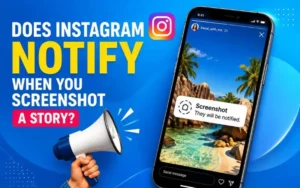
Instagram notifies you when you screenshot stories?
Stories are deleted after 24 hours. This is why many users save them as screenshots. Instagram does not currently notify the story owner when someone screenshots his or her stories.
Included in this is:
- Photo Stories
- Video Stories
- Close Friends Stories
- Polls
- Music stories
- Question Stickers
- Countdown stories
Instagram tried a temporary feature a few years back that displayed story screenshot alerts. During this time, users were able to see who had screenshotted their content. The company removed this feature later.
Story screenshots are currently private.
Why Story Screenshots are Popular
Stories are often temporary updates that users don’t want to miss. Stories are a great way for businesses and influencers to announce limited-time deals, events, and new products.
Users often screenshot stories to:
- Restaurant deals
- Fashion launches
- Sports schedules
- Shop online and save money
- Event Information
- Travel Updates
Users are naturally inclined to take screenshots of temporary content, as they know that the story will be gone within a few days.
Instagram notifies you when you screenshot reels?
Instagram reels has become one of the most popular features on Instagram for marketing and entertainment. Videos of a short duration now dominate the content in technology, sports and fitness, food, online business, travel, as well as other industries.
Instagram does not inform creators when someone screenshots a reel.
Creators can’t see:
- Who took the screenshot?
- How many screenshots have been taken?
- What device captured the image?
People save video clips to capture tutorials, product names or subtitles. They also use them for gaming tips and technical information.
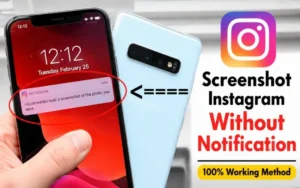
Can you screen record reels?
Users can screen record reels even without receiving notifications. Instagram does not notify creators when someone records their reel content. This is particularly useful for educational videos, technology explainers and tutorials on smartphones, as well as software demonstrations.
What happens when you send a screenshot in a direct message?
Instagram direct messages are different from public content. The type of message you are viewing will determine whether a screenshot is displayed. Instagram does not alert users when they take screenshots in normal chats.
Users can take screenshots:
- Text Conversations
- Shared reels
- Memes
- Permanent photos
- Voice Notes
- Shared posts
- Link
The other person won’t know that the screenshot was taken.
Users who wish to store important information such as delivery details, chats with customer service, booking details or online shopping conversations can use this feature.
Screenshot Notifications when in Vanish mode
The most important exception that users need to understand is Vanish Mode. Instagram will notify users when someone screenshots an entire conversation in Vanish Mode. This feature is for temporary chats, where messages automatically disappear after viewing.
If you take a screenshot:
- The chat window will now display a notification
- Other participants can view the screenshot activity
- Instagram records all the actions within a conversation
Instagram’s Vanish Mode is more private and therefore adheres to stricter screenshot restrictions.
What is Vanish Mode?
Users can send messages that will disappear when the conversation ends. It is often used for private conversations or temporary sharing.
Even if the message disappears, screenshots and screen recording can still occur.
What is the screen recording notification on Instagram?
Users often wonder if screen recordings trigger notifications instead of screenshots. Instagram doesn’t notify users of screen recordings in most cases.
The following applies:
- Storys
- Reels
- Posts
- Profiles
- Chats are a great way to meet new people.
- Live Videos
If recorded, however, content that disappears when shared via Vanish Mode can still trigger an alert.
Screenshot vs Screen Recording Comparison
| Features | Screenshot | Screen Recording |
|---|---|---|
| Captures | Single Image | Full Video Activity |
| File Size | Smaller | Larger |
| Best for | Photos and text | Videos and tutorials |
| Notification Risk | Low-cost | Low-quality content that disappears |
| Common Usage | Saving Posts | Recording reels, stories and more |
Screen recording is becoming increasingly popular, especially for educational and technological content, such as tutorials on technology, video games, sports highlights and sporting clips.
Instagram notifies you when you screenshot profiles?
Instagram does not alert users when someone screenshots a profile page.
Included in this is:
- Profile pictures
- Bios
- Highlights
- Followers List
- Lists
Many people save profiles to facilitate networking, research on influencers, collaboration opportunities or customer service.
Business people can also use competitor profiles as a tool to analyse marketing strategies and ideas.
Instagram notifies you when you screenshot disappearing photos?
This is an important exception.
Instagram will usually notify the sender if the recipient screenshots the disappearing image or video sent through Instagram direct message.
The following are some of the temporary media options:
- View One
- Replay
Instagram is different because it’s designed to be used for private communication.
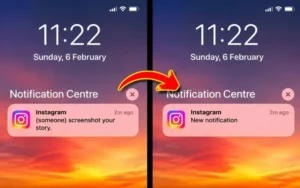
Common Myths about Instagram Screenshot Notifications
Instagram screenshots are a subject of many online misconceptions. It is a myth that Instagram monitors all screenshot activity. The idea that the owners of stories can view screenshots is a common myth. A third-party app can be used to reveal screenshot information, according to another rumor. These apps are often unreliable, and can even pose privacy risks.
Instagram sends only screenshot alerts when a message disappears.
What Businesses Can Learn from Instagram Screenshots
Screenshots are a key part of marketing online. Restaurants, gyms and salons share information with their customers. Electronics stores, fashion brands, and electronics stores also do the same.
Screenshot of many users
- Prices for products
- Discounts are available
- Menus
- Announcements of Events
- Specifications
- Delivery Information
Businesses in the technology sector can benefit most from screenshots, as users compare prices of smartphones, gadget features and software before purchasing.
How to protect your privacy on Instagram
Users should protect sensitive online information, even though screenshots are usually private. A private account allows you to control who is able to view your posts and stories. Instagram allows users to hide their stories from certain people, and create Close Friends Lists for more personal sharing.
Social media apps should not be used to send confidential documents, passwords or financial information. Although temporary messaging may seem safer, screenshots can still be taken.
Conclusion:
Instagram users often save content via screenshots and screen recording for personal, education, shopping and entertainment reasons. Instagram doesn’t notify users when someone screenshots a post, story, reel, profile, highlight, or regular chat. There are a few exceptions, including disappearing photos, temporary files, and Vanish Mode chats where alerts can appear. Understanding these rules allows users to use Instagram with more confidence while protecting their online privacy.
Users should always be aware of future privacy updates as Instagram continues to evolve.
Explore also: New on Snapchat 2026 | Every Major Update & Feature Explained
FAQs
Instagram notifies you when you screenshot an Instagram post?
No. Instagram does not alert users when someone screenshots regular captions or posts.
Instagram notifies you when you screenshot a story?
No. No.
Instagram notifies you when you take screenshots.
No. No.
What happens when you take a screenshot in a chat?
Vanish Mode screenshots can send alerts, even though regular chats don’t.
Can anyone tell if you screen record Instagram?
No. Unless the content disappears, most screen recordings are private.
What happens when you take a screenshot of your profile picture?
No. Users are not notified of screenshots of their profile.
What are the best apps for screenshot tracking?
Many third-party applications that claim to detect screenshots can be unreliable, and create security risks.