Artificial intelligence has transformed video creation, allowing anyone to produce cinematic videos from simple text prompts. Modern AI video generators can create commercials, short films, social media reels, product videos, and educational content in minutes. However, the quality of the final video depends less on the AI tool itself and more on how well the prompt is written.
Many creators use simple prompts like “a woman walking through a forest” and expect professional results. While AI can generate a basic scene, it often struggles with character consistency, realistic camera movement, lighting, and visual storytelling due to missing important details.
This is where Unified Cinematic Video Prompts make a difference. Instead of using random keywords, this structured prompt-writing method combines the subject, appearance, action, environment, camera settings, lens, lighting, mood, color grading, rendering quality, and negative prompts into one organized instruction. Giving the AI complete creative guidance results in more realistic visuals, smoother motion, stronger storytelling, and fewer generation errors.
Whether you’re a content creator, marketer, filmmaker, educator, or designer, learning AI video prompt engineering can dramatically improve your workflow and the quality of your videos. In this guide, you’ll learn how unified cinematic prompts work, why they outperform basic prompts, and how to write professional prompts that produce consistent, cinematic results across today’s leading AI video generators.
Quick Answer: What Is a Unified Cinematic Video Prompt?
A Unified Cinematic Video Prompt is a structured AI prompt that combines the subject, appearance, action, environment, camera settings, lens, lighting, mood, color grading, rendering quality, and negative prompts into one organized instruction. This structured approach helps AI video generators create more realistic, visually consistent, and cinematic videos while giving creators greater control over storytelling, camera behavior, and overall video quality.
Key Takeaways
- A unified cinematic prompt follows a structured format instead of using random keywords.
- Detailed prompts improve character consistency, realistic motion, and camera control.
- Lighting, lens selection, color grading, and mood are essential for creating cinematic AI videos.
- Negative prompts help eliminate common AI errors such as blurry faces, extra limbs, watermarks, and distorted anatomy.
- Most modern AI video generators produce better results when prompts follow a logical, film-inspired structure.
- Learning AI video prompt engineering reduces editing time, improves workflow efficiency, and delivers more professional results.
What Is a Unified Cinematic Video Prompt?
A Unified Cinematic Video Prompt is a professional prompt-writing framework that gives AI video models a complete creative blueprint instead of a simple scene description. Rather than telling the AI only what to generate, it explains how the entire scene should look, move, and feel.
You can think of it as the digital equivalent of a film production brief. Before filming begins, directors, cinematographers, lighting technicians, costume designers, and production teams plan every visual detail—from the main subject and camera setup to lighting, mood, and color grading. A unified prompt brings these filmmaking principles into AI video generation, allowing the model to produce scenes that are more coherent, realistic, and visually engaging.
Unlike basic prompts that rely on AI to guess missing information, a unified prompt provides clear instructions in a logical order. This reduces ambiguity, improves consistency across frames, and gives creators greater control over the final output.
Example: Basic Prompt vs. Unified Cinematic Prompt
Basic Prompt
A woman walking through a forest.
This prompt tells the AI only the subject and location. Everything else—camera angle, lighting, clothing, mood, and movement—is left to chance.
Unified Cinematic Prompt
A confident female explorer wearing a dark green waterproof hiking jacket, brown leather boots, and a weatherproof backpack walks slowly along a misty pine forest trail during golden hour. A smooth cinematic tracking shot follows her from behind using a 35mm anamorphic lens with warm volumetric sunlight filtering through tall trees. Soft natural fog, shallow depth of field, realistic textures, subtle Kodak-style color grading, HDR rendering, and stabilized camera movement create an adventurous atmosphere. Negative Prompt: blurry face, extra limbs, watermark, text overlay, distorted anatomy, low-quality textures, oversaturated colors.
The second prompt gives the AI a complete production plan instead of a simple idea. As a result, it produces videos with stronger storytelling, more consistent characters, smoother camera motion, realistic lighting, and a polished cinematic appearance.
Must Visit: 100 Cinematic Video Prompt Examples for AI Video Generators
Why Is It Called a “Unified” Prompt?
The word unified refers to bringing every important filmmaking element together into one cohesive prompt rather than relying on scattered or incomplete instructions.
Instead of describing only the subject and hoping the AI chooses suitable camera angles, lighting, or colors, a unified prompt intentionally combines all these components into a structured workflow.
A typical unified prompt includes:
- Subject
- Appearance
- Action
- Environment
- Camera angle
- Camera movement
- Lens selection
- Lighting
- Mood
- Color grading
- Rendering quality
- Negative prompts
Each component supports the others, creating a clear creative direction that minimizes ambiguity and helps the AI maintain consistency throughout the generated video.
How AI Video Models Interpret Prompts
Modern AI video generators do much more than recognize individual words. They analyze the relationships between concepts, visual cues, actions, and cinematic instructions to predict how a scene should unfold over time.
When processing a prompt, the AI attempts to answer questions such as:
- Who or what is the main subject?
- What does the subject look like?
- What action is taking place?
- Where does the scene occur?
- From which camera angle should it be filmed?
- How should the camera move?
- What lighting creates the intended atmosphere?
- What emotional tone should the scene convey?
- What visual style should be applied?
- Which unwanted elements should be avoided?
If this information is incomplete, the AI fills the gaps by making assumptions. Those assumptions often lead to inconsistent characters, unrealistic movement, incorrect lighting, or scenes that don’t match the creator’s vision.
A structured prompt minimizes these assumptions by providing clear, sequential instructions that guide the AI from beginning to end.
Unified Prompt vs. Traditional AI Prompt
Many beginners assume that adding a few descriptive words is enough to create a cinematic video. In reality, traditional prompts often lack the detail required for consistent, high-quality results.
| Feature | Traditional Prompt | Unified Cinematic Prompt |
| Subject Description | Basic | Detailed and consistent |
| Character Identity | Often inconsistent | Clearly defined |
| Camera Instructions | Rarely included | Fully specified |
| Lighting | Generic or missing | Purposefully designed |
| Color Grading | Usually omitted | Integrated into the prompt |
| Storytelling | Limited | Strong visual narrative |
| Rendering Quality | Inconsistent | High-quality and intentional |
| Negative Prompt | Rarely used | Essential for cleaner outputs |
A traditional prompt may generate an acceptable clip, but a unified cinematic prompt provides the AI with enough creative context to produce videos that feel more polished, coherent, and professionally directed.
Why Prompt Engineering Matters in AI Video Creation
AI video generation is not only about choosing the right software. Regardless of which AI platform you use, the prompt remains the primary factor influencing the final output.
Prompt engineering transforms simple text instructions into a detailed production plan that helps AI understand both the technical and creative aspects of your vision.
Better Character and Scene Consistency
One of the most common challenges in AI-generated videos is maintaining consistency across multiple frames. Characters may suddenly change facial features, clothing, hairstyles, or proportions, while environments can shift unexpectedly.
A well-structured prompt minimizes these inconsistencies by giving the AI a stable set of visual references to follow throughout the entire scene.
This consistency becomes even more important for longer videos, recurring characters, branded content, or storytelling projects.
More Natural Camera Behavior
Professional cinematography relies on intentional camera movement to guide the audience’s attention and create emotional impact.
When prompts include clear camera instructions—such as tracking shots, dolly movements, crane shots, or slow push-ins—the AI is more likely to generate smooth, cinematic motion rather than static or unpredictable camera behavior.
As a result, videos feel more immersive and visually engaging.
Improved Storytelling
Even short AI-generated videos tell a story. A unified prompt helps establish a beginning, a clear subject, meaningful action, and a cohesive atmosphere that work together to support the narrative.
By describing not only what appears on screen but also how it should be presented, prompt engineering creates videos that feel intentional rather than randomly assembled.
Higher Visual Realism
Lighting, lens selection, color grading, and rendering quality all influence how realistic a generated video appears.
Including these elements within the prompt helps the AI create believable shadows, natural depth, realistic textures, and cinematic compositions that closely resemble professionally filmed footage.
Fewer AI Generation Errors
Without sufficient guidance, AI models may introduce problems such as:
- Distorted hands or faces
- Extra limbs
- Duplicate subjects
- Unwanted text overlays
- Visual artifacts
- Flickering objects
- Low-quality textures
Adding structured descriptions together with effective negative prompts significantly reduces these common issues.
Faster Creative Workflow
Creators often spend considerable time regenerating videos because the original prompt lacks clarity.
A unified prompt reduces guesswork by giving the AI detailed creative instructions from the beginning. This leads to fewer revisions, faster production, and a more efficient workflow—especially for marketers, agencies, and content teams producing videos at scale.
What’s Next?
In the next part of this guide, we’ll break down the complete anatomy of a unified cinematic video prompt, explain every core component in detail, and show you how to build professional prompts step by step for consistently high-quality AI-generated videos.
The Anatomy of a Unified Cinematic Video Prompt
A unified cinematic video prompt works like a production blueprint for an AI video generator. Instead of describing only the main subject, it provides a complete set of creative instructions that guide the AI through every stage of video generation. This structured approach helps the model understand not only what should appear in the scene but also how it should look, move, and feel.
Professional filmmakers don’t rely on guesswork. Before filming begins, they define the subject, costume, location, lighting, camera setup, lens selection, and overall visual style. A unified prompt follows the same workflow, allowing AI models to generate videos with greater consistency, realism, and cinematic quality.
A typical unified cinematic video prompt follows this logical structure:
Subject
↓
Appearance
↓
Action
↓
Environment
↓
Camera Angle
↓
Camera Movement
↓
Lens
↓
Lighting
↓
Mood
↓
Color Grading
↓
Rendering Quality
↓
Negative Prompt
Following the same order every time makes prompts easier to write, edit, and reuse while reducing ambiguity for the AI.
Core Components of a Professional AI Video Prompt
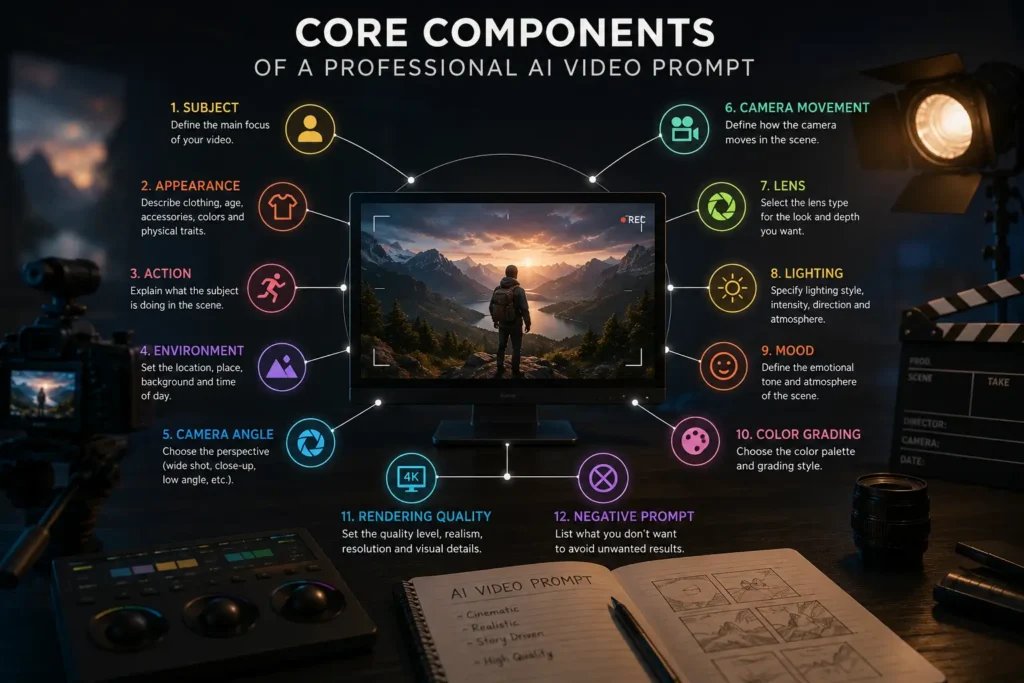
Every professional prompt is built from several essential components. Together, these elements create a clear visual language that AI models can interpret more accurately.
Subject
The subject is the focal point of your video. It tells the AI who or what the audience should pay attention to throughout the scene.
A subject can be:
- Human
- Animal
- Product
- Vehicle
- Building
- Robot
- Fantasy creature
- Historical figure
The more specific the description, the more consistent the generated video becomes.
Basic Example
A man.
Professional Example
A 32-year-old wildlife photographer wearing a dark green hiking jacket and carrying a professional DSLR camera.
Subject Checklist
- Clearly identify the main subject.
- Include age or approximate age when relevant.
- Mention distinctive physical features.
- Describe clothing or important accessories.
- Keep the description consistent throughout longer videos.
Appearance
Appearance defines how the subject looks and helps maintain visual consistency across multiple frames.
Include details such as:
- Clothing
- Age
- Hair color and style
- Facial expression
- Accessories
- Body type
- Colors
- Materials
Example
Wearing a weathered brown leather jacket, black cargo pants, hiking boots, fingerless gloves, and a vintage leather backpack.
A well-defined appearance reduces unexpected changes in clothing, hairstyles, or facial features during generation.
Action
Action introduces movement into the scene and transforms a static image into a cinematic sequence.
Instead of writing:
Standing on a mountain.
Describe the movement naturally.
Better Example
Slowly walking toward the mountain summit while adjusting the camera and looking at the sunrise.
Dynamic actions create more engaging and realistic videos.
Environment
The environment establishes the location and atmosphere surrounding the subject.
Common environments include:
Indoor
- Office
- Coffee shop
- Library
- Museum
- Apartment
- Restaurant
Outdoor
- Beach
- Forest
- Mountains
- Desert
- Waterfall
- City streets
- Countryside
Fantasy
- Floating islands
- Alien planets
- Medieval castles
- Ancient temples
- Underwater cities
Example
A mist-covered pine forest with towering trees, moss-covered rocks, and warm sunlight filtering through the branches.
Rich environmental descriptions make scenes feel immersive while supporting the story.
Must visit: ChatGPT vs Gemini vs Claude | Which AI is Best in 2026?
Weather and Atmospheric Effects
Weather adds realism and emotional depth to a scene. Small atmospheric details often have a significant impact on cinematic quality.
Popular effects include:
- Rain
- Snow
- Fog
- Smoke
- Dust
- Wind
- Fire
- Water splashes
- Falling leaves
- Volumetric mist
Example
Light morning fog drifting between tall pine trees as gentle wind moves the surrounding leaves.
Natural atmospheric effects help scenes feel more alive.
Camera Angle
Camera angles influence how the audience experiences the story. Choosing the right perspective can make a character appear powerful, vulnerable, dramatic, or intimate.
| Camera Angle | Best For | Visual Effect |
| Wide Shot | Landscapes | Scale and environment |
| Medium Shot | Conversations | Natural balance |
| Close-Up | Emotions | Facial detail |
| Low Angle | Heroes | Strength and authority |
| High Angle | Vulnerability | Isolation |
| Bird’s-Eye View | Large environments | Perspective |
| POV | Action scenes | Viewer immersion |
| Dutch Angle | Horror | Unease and tension |
Specify the camera angle whenever possible instead of leaving the framing to the AI.
Camera Movement
Movement gives AI-generated videos a cinematic feel by guiding the viewer through the scene.
Common camera movements include:
- Dolly In
- Dolly Out
- Pan
- Tilt
- Orbit
- Crane Shot
- Drone Flyover
- Tracking Shot
- Push In
- Pull Out
- Handheld
- Steadicam
Best Use Cases
| Camera Movement | Best Used For |
| Dolly In | Emotional scenes |
| Tracking Shot | Following people or vehicles |
| Orbit | Product showcases |
| Drone Flyover | Landscapes |
| Crane Shot | Establishing shots |
| Push In | Building suspense |
| Pull Out | Ending scenes |
| Handheld | Documentary style |
| Steadicam | Smooth walking sequences |
Smooth camera movement helps AI videos resemble professional cinematography.
Lens Selection
Lens choice affects perspective, background compression, and the overall cinematic style.
| Lens | Best Use |
| 24mm | Landscapes and architecture |
| 35mm | General cinematic scenes |
| 50mm | Natural perspective |
| 85mm | Portraits |
| 135mm | Telephoto shots |
| Macro | Close-up product details |
| Anamorphic | Hollywood-style cinematic visuals |
| Telephoto | Wildlife and sports |
For most cinematic scenes, a 35mm or 50mm lens provides a natural and balanced perspective, while an anamorphic lens adds the wide-screen aesthetic commonly seen in feature films.
Lighting
Lighting defines the mood, depth, and realism of a scene.
Popular lighting styles include:
- Golden Hour
- Blue Hour
- Studio Lighting
- Candlelight
- Neon Lighting
- Rim Lighting
- HDR Lighting
- Volumetric Sunlight
Example
Warm golden hour sunlight creating soft shadows with volumetric rays passing through the forest canopy.
Lighting should always support the emotional tone of the scene.
Mood
Mood communicates the emotional atmosphere you want viewers to experience.
Examples include:
- Romantic
- Epic
- Calm
- Inspirational
- Horror
- Documentary
- Luxury
- Fantasy
- Adventure
- Mystery
Instead of writing “beautiful,” describe the emotional feeling more precisely.
Example
A peaceful and nostalgic atmosphere that inspires curiosity and exploration.
Color Grading
Color grading gives the final video its cinematic identity by controlling color balance, contrast, and visual tone.
Common styles include:
- Kodak Film
- Fuji Film
- Hollywood Teal & Orange
- Noir
- Cyberpunk
- Warm Vintage
- HDR Natural
- Desaturated
The grading style should complement the subject, lighting, and mood.
Rendering Quality
Rendering quality tells the AI how polished and realistic the final output should appear.
Common quality settings include:
- Ultra-realistic
- Photorealistic
- HDR
- 4K
- 8K
- High Detail
- Realistic Textures
- Cinematic Depth of Field
- Ray Tracing
- Motion Blur
- Film Grain
Negative Prompt
A negative prompt tells the AI which elements should not appear in the final video.
Common examples include:
- Blurry image
- Low quality
- Watermark
- Text overlay
- Duplicate people
- Distorted anatomy
- Extra limbs
- Oversaturated colors
- Flickering
- Noise
- Compression artifacts
Adding negative prompts is one of the easiest ways to reduce common AI generation errors and improve overall output quality.
Step-by-Step Guide to Writing a Unified Cinematic Video Prompt
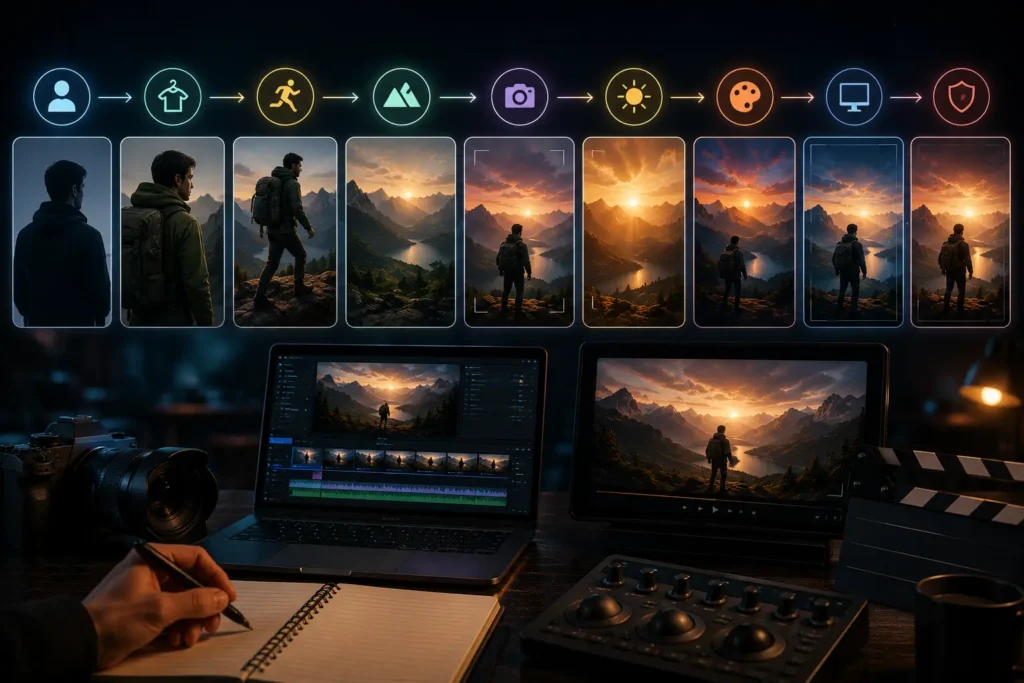
A repeatable workflow helps you create consistent prompts regardless of the AI video generator you use.
Step 1: Choose Your Subject
Clearly identify the main focus of the video.
Example:
A professional wildlife photographer.
Step 2: Describe the Appearance
Add enough visual detail to maintain consistency.
Example:
Wearing a dark green waterproof hiking jacket, brown cargo pants, leather boots, and carrying a DSLR camera.
Step 3: Define the Action
Explain what the subject is doing.
Example:
Walking carefully along a rocky trail while photographing eagles.
Step 4: Build the Environment
Describe where the scene takes place.
Example:
Snow-covered mountain peaks during sunrise with drifting clouds and gentle morning mist.
Step 5: Select the Camera Setup
Choose the camera angle, movement, and lens.
Example:
Wide tracking shot using a 35mm anamorphic lens with smooth gimbal movement.
Step 6: Choose the Lighting and Mood
Describe the emotional atmosphere.
Example:
Warm golden hour sunlight with a peaceful and adventurous mood.
Step 7: Add Rendering Quality
Specify the visual quality.
Example:
Ultra-realistic 8K HDR rendering with cinematic depth of field and subtle film grain.
Step 8: Include a Negative Prompt
Tell the AI what to avoid.
Example:
No blurry faces, no watermark, no text, no duplicate people, no extra limbs, no flickering artifacts.
Professional Unified Prompt Example
Below is an example that combines every component into one cohesive prompt.
A professional wildlife photographer wearing a dark green waterproof hiking jacket, brown cargo pants, leather hiking boots, and carrying a DSLR camera walks carefully along a rocky mountain trail while photographing soaring golden eagles. Snow-covered peaks rise in the background beneath a warm golden-hour sunrise with drifting clouds and gentle morning mist. A wide cinematic tracking shot follows behind the subject using a 35mm anamorphic lens with smooth gimbal movement. Warm volumetric sunlight creates soft shadows while natural Kodak-inspired color grading enhances realism. The atmosphere is peaceful, adventurous, and inspiring. Ultra-realistic 8K HDR rendering with cinematic depth of field, realistic textures, subtle film grain, and smooth motion blur. Negative Prompt: blurry image, distorted hands, extra limbs, duplicate objects, watermark, text overlay, oversaturated colors, flickering, low-resolution textures, unrealistic anatomy.
Benefits of Using Unified Cinematic Video Prompts
A unified cinematic video prompt does much more than improve the appearance of AI-generated videos. It provides a structured workflow that helps AI models interpret your creative intent more accurately, resulting in consistent, professional-quality output.
Whether you’re creating YouTube content, marketing campaigns, product advertisements, short films, or social media videos, a structured prompt can significantly improve both efficiency and visual quality.
Better Character Consistency
One of the biggest challenges in AI video generation is maintaining the same character throughout multiple frames. Without detailed instructions, AI may unexpectedly change clothing, hairstyles, facial features, or accessories.
A unified prompt establishes a consistent visual identity from the beginning, helping AI preserve the subject’s appearance across the entire scene.
More Accurate Camera Behavior
Professional filmmakers carefully choose camera angles and movements to guide the audience’s attention. AI video generators work the same way.
By specifying camera direction—such as a tracking shot, dolly movement, orbit, or crane shot—you gain greater control over how each scene is presented.
The result is smoother motion and a more cinematic viewing experience.
Stronger Storytelling
Every compelling video tells a story.
A structured prompt naturally creates a narrative by defining:
- The main subject
- The subject’s actions
- The surrounding environment
- Camera perspective
- Emotional atmosphere
These elements work together to produce scenes that feel intentional rather than randomly generated.
Improved Visual Realism
Lighting, lens selection, atmospheric effects, and color grading all contribute to realism.
Instead of relying on default AI decisions, unified prompts specify these cinematic elements directly, leading to more believable environments and natural-looking footage.
Reduced AI Generation Errors
Well-structured prompts combined with effective negative prompts reduce common problems such as:
- Blurry faces
- Extra limbs
- Flickering
- Duplicate objects
- Distorted anatomy
- Random text
- Watermarks
Fewer errors mean less time spent regenerating scenes.
Faster Production Workflow
Many creators repeatedly generate the same video because their original prompt lacked sufficient detail.
Using a structured framework allows you to:
- Create reusable prompt templates
- Produce more predictable results
- Reduce unnecessary revisions
- Build a consistent production workflow
Over time, this approach saves both time and computing resources.
Best Practices for Writing Better AI Video Prompts
Even the most advanced AI models depend on clear instructions. Following a few proven practices can dramatically improve your results.
Think Like a Film Director
Instead of describing only the subject, imagine planning an entire movie scene.
Ask yourself:
- What should viewers notice first?
- How should the camera move?
- What emotion should the audience feel?
- What type of lighting fits the story?
Thinking like a director naturally leads to more cinematic prompts
Keep Information Organized
Always write prompts in a logical order.
A consistent structure helps AI understand relationships between different visual elements.
A recommended sequence is:
Subject
↓
Appearance
↓
Action
↓
Environment
↓
Camera
↓
Lens
↓
Lighting
↓
Mood
↓
Color Grading
↓
Rendering Quality
↓
Negative Prompt
Use Professional Cinematic Vocabulary
Modern AI video generators understand many filmmaking terms.
Examples include:
- Tracking shot
- Dolly in
- Orbit
- Crane shot
- Bird’s-eye view
- Anamorphic lens
- Shallow depth of field
- Film grain
- HDR lighting
- Volumetric light
Using professional terminology often produces more cinematic results.
Maintain Visual Consistency
Avoid changing important character details unless the story requires it.
Keep the following consistent:
- Clothing
- Hair
- Accessories
- Lighting
- Environment
- Visual style
Consistency is especially important when creating multi-scene videos.
Match Lighting to the Mood
Lighting should support the emotional atmosphere.
| Mood | Recommended Lighting |
| Romantic | Golden Hour |
| Horror | Moonlight + Fog |
| Documentary | Natural Daylight |
| Luxury | Soft Studio Lighting |
| Fantasy | Volumetric Sunlight |
| Sci-Fi | Neon Lighting |
Use Atmospheric Effects Naturally
Atmospheric details make scenes more immersive.
Examples include:
- Light fog
- Falling snow
- Gentle rain
- Floating dust
- Ocean mist
- Wind-blown leaves
- Smoke
- Fire embers
Avoid adding every effect at once.
Natural combinations create more believable scenes.
Test and Refine Your Prompts
Prompt engineering is an iterative process.
Rather than rewriting everything, adjust one element at a time:
- Camera movement
- Lighting
- Mood
- Lens
- Environment
Small refinements often produce significant improvements.
Common Mistakes That Reduce AI Video Quality
Many AI-generated videos fail because of poorly written prompts rather than limitations of the AI model itself.
Understanding these common mistakes will help you create cleaner, more realistic videos.
Mistake 1: Too Little Detail
Poor Prompt
A person walking.
Improved Prompt
A young travel photographer wearing outdoor hiking gear walks along a coastal cliff during golden hour while carrying a professional DSLR camera.
Mistake 2: Too Much Detail
Overloading a prompt with unnecessary descriptions can confuse the AI.
Focus only on details that directly influence the final scene.
Mistake 3: Mixing Different Art Styles
Avoid prompts like:
Photorealistic, anime, watercolor, cyberpunk, oil painting.
Instead, choose one clear visual style.
Mistake 4: Contradictory Instructions
Avoid conflicting descriptions.
Incorrect
Midnight with bright afternoon sunlight.
Better
Moonlit forest illuminated by cool blue moonlight and soft fog.
Mistake 5: Weak Subject Descriptions
Instead of:
A woman.
Write:
A confident businesswoman in her early thirties wearing a tailored navy-blue suit and carrying a leather briefcase.
Mistake 6: Ignoring Camera Direction
Without camera instructions, AI chooses random framing.
Always specify:
- Camera angle
- Camera movement
- Lens
Mistake 7: Forgetting Negative Prompts
Negative prompts reduce:
- Blurry faces
- Watermarks
- Extra limbs
- Duplicate people
- Flickering
- Distorted anatomy
Mistake 8: Unrealistic Scene Combinations
Keep environments logical unless intentionally creating fantasy.
Avoid combinations like:
- Snowstorm in a tropical jungle
- Bright summer sunlight inside a dark cave
- Medieval castle with futuristic traffic lights
Consistency improves realism.
Best AI Video Generators for Unified Prompts
While prompt structure remains similar across platforms, each AI video generator has unique strengths.
| AI Tool | Best For | Resolution | Camera Control | Character Consistency | Strengths | Limitations |
| Sora | Cinematic storytelling | High | Excellent | Excellent | Realistic long-form scenes | Limited availability |
| Veo | Professional filmmaking | High | Excellent | Excellent | Natural motion | Limited public access |
| Kling AI | Character animation | High | Very Good | Very Good | Human realism | Requires prompt refinement |
| Runway | Marketing videos | High | Good | Good | Fast editing workflow | Clip length limits |
| Pika | Social media content | HD | Moderate | Good | Easy to learn | Fewer advanced controls |
| PixVerse | Creative concepts | HD | Moderate | Good | Quick generation | Scene consistency varies |
| Luma Dream Machine | Realistic environments | High | Good | Good | Smooth camera motion | Still evolving |
| Hailuo AI | Creative experimentation | High | Moderate | Good | Strong visual creativity | Requires iterative prompting |
No matter which platform you use, a structured unified prompt helps improve output quality and consistency.
Final Thoughts
AI video generation is advancing rapidly, but the quality of the final output still depends on the quality of the prompt. A unified cinematic video prompt provides a clear, repeatable framework that helps AI models understand your creative vision with greater accuracy.
By combining the subject, appearance, action, environment, camera direction, lens selection, lighting, mood, color grading, rendering quality, and negative prompts into a logical sequence, you can produce videos that are more realistic, visually consistent, and cinematic.
Like any creative skill, prompt engineering improves with practice. Start with a structured template, experiment with different cinematic techniques, and refine your prompts based on the results. Over time, you’ll build a library of reusable prompts that streamline your workflow and help you create professional-quality AI videos across multiple platforms.
Whether you’re producing short-form social media content, commercial advertisements, documentaries, educational videos, or cinematic storytelling projects, mastering unified prompt engineering will give you greater creative control and more consistent results as AI video technology continues to evolve.
Must Visit: Back Casting Room: What It Is, How It Works, and Why It Matters in 2026
Frequently Asked Questions
What is a unified cinematic video prompt?
A unified cinematic video prompt is a structured instruction that combines the subject, appearance, action, environment, camera settings, lighting, mood, color grading, rendering quality, and negative prompts into one organized prompt.
Why should I use a unified prompt?
It improves realism, character consistency, camera behavior, storytelling, and overall video quality while reducing common AI generation errors.
Which AI video generators support unified prompts?
Most modern AI video generators—including Sora, Veo, Kling AI, Runway, Pika, PixVerse, Luma Dream Machine, and Hailuo AI—work well with structured prompts
How long should a prompt be?
There is no ideal word count. A prompt should be detailed enough to communicate your vision clearly without including unnecessary information.
Can one prompt work across different AI tools?
Yes. Although minor adjustments may be needed, the same structured prompt framework can usually be adapted for multiple AI video generators.
Should I include camera movements?
Yes. Camera movements such as tracking shots, dolly-ins, and crane shots make videos feel more cinematic and immersive.
Are negative prompts necessary?
They are highly recommended because they reduce unwanted artifacts like blurry faces, distorted anatomy, duplicate objects, and watermarks.
What makes an AI video look cinematic?
Strong composition, realistic lighting, intentional camera movement, professional color grading, and consistent storytelling all contribute to a cinematic appearance.
How can I improve character consistency?
Use detailed appearance descriptions and keep important characteristics consistent throughout the prompt.
Can beginners create professional AI prompts?
Absolutely. Following a structured prompt framework makes it easier for beginners to generate high-quality cinematic videos without prior filmmaking experience.
Which lighting style looks most realistic?
Golden hour, natural daylight, and soft studio lighting generally produce the most realistic results, depending on the scene and mood.
How can I avoid AI generation errors?
Write clear prompts, avoid contradictory instructions, maintain logical consistency, and include effective negative prompts.