
Despite the advent of contemporary games, retro gaming persists across the globe, with lots of gamers enjoying classic Sega games. Sega’s legendary consoles have delivered some of the best moments in gaming.
Nowadays, emulators are available for Android devices to make classic Sega games accessible to people who don’t have the original console. Therefore, the popularity of the emulators among gamers continues to increase.
There are various free Sega Android emulators available, making it hard to choose the best one. Some concentrate on speed and performance, and others concentrate on compatibility, customization, and user-friendly elements.
Understanding Sega Emulators
A Sega emulator is software that emulates a Sega gaming console. It enables the playing of games that were developed for the Sega consoles on Android devices without having to purchase the original console.
The emulator simulates the hardware’s operation and converts the instructions for the classic Sega games into ones that are understood by modern Android-powered devices. This process will make it possible to play retro games on smartphones and tablets.
Sega has some popular systems that are emulated:
- Sega Genesis
- Sega Mega Drive
- Sega Master System
- Sega Game Gear
- Sega CD
- Sega 32X
Today’s Android devices have a lot more juice than the original Sega consoles, and many emulators can offer a smoother playing experience with better visual options available.
Why Sega Games Remain Popular
Sega was one of the most impactful game manufacturers of the late ’80s and ’90s. Its 2D games are still fun a lot of years after they were originally released.
There are several reasons for their popularity over the years.
One is that Sega titles frequently had very creative gameplay; this was something that still makes them playable today. Platformers, arcade action games, and creative sports games still draw in players with their fast-paced gameplay.
Secondly, retro graphics evoke a sense of nostalgia. The pixel art trend is back, and there are plenty of Sega fans who enjoy the artwork of old-school games.
Thirdly, Sega has a library of many iconic franchises that shaped gaming history. These games still inspire today’s game developers and have dedicated fan bases across the globe.
This long-lasting popularity means that many gamers are looking for the best free Sega Android emulator to enjoy their beloved games again.
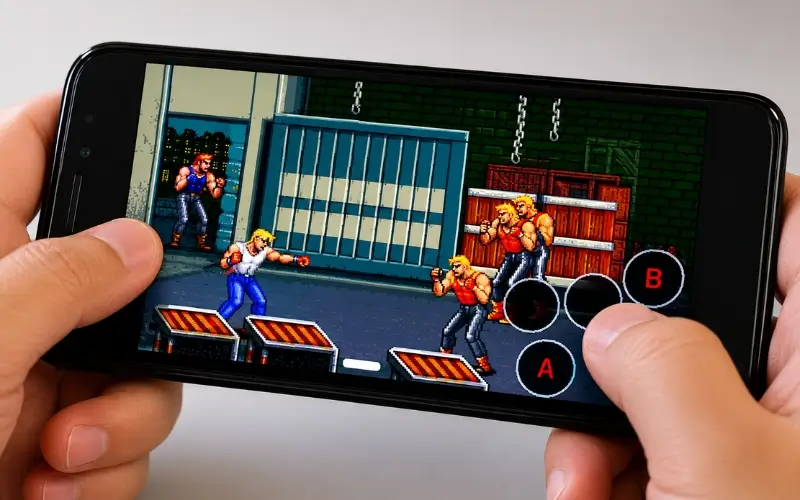
Features to Look for in a Sega Emulator
Not every emulator is the same. There are a number of key features users should consider before downloading an emulator.
Compatibility
The number of Sega games that an emulator can run is determined by compatibility. High compatibility makes for fewer crashes, graphical problems, and interruptions to gameplay.
A good emulator should emulate various Sega games and hardware configurations.
Performance
For a good gaming experience, performance is key. The emulator should have smooth frame rates, with minimal lag and sound problems.
It is particularly crucial in games of action, where it is essential to have actions timed correctly.
Controller Support
Some players prefer to use a controller rather than the touch screen. A controller with Bluetooth capability can enhance the comfort of playing a game dramatically.
Some of the popular Android controllers integrate easily with the latest emulators.
Save States
Save State function – ability to save at any stage of a game.
Save states are different from traditional game saves, as they include the exact state of the game at the time of their creation; they assist in resuming the game at a later time.
Graphics Enhancements
These days, emulators often have visual enhancements that simply couldn’t be done in the original hardware.
Examples include:
- Resolution scaling
- Texture filtering
- Aspect ratio adjustments
- Screen smoothing
- Visual shaders
These improvements can help make the traditional games look better on high-resolution screens.
User Interface
The user-friendly interface allows users to instantly launch games, organize files, control settings, and adjust controls. For novice users, it is helpful to find emulators that are easy to use and have a simple navigation system.
Popular Emulator Choices for Android
In the realm of retro gaming, a handful of emulators are frequently mentioned when it comes to the best free Sega Android emulator.
There is no one-size-fits-all solution for different emulators.
RetroArch
RetroArch is an emulation platform that is one of the most versatile.
It is not an emulator itself, but rather a frontend that is capable of running multiple emulator cores. This makes it possible for the users to re-create many different gaming systems in one application.
Advantages include:
- Extensive customization
- Wide system support
- Regular updates
- Advanced graphics options
- Active community
Beginners might find that its setup process can be a bit complicated, though.
MD.emu
MD.emu is mainly Sega-focused and is compatible with a number of different Sega platforms.
Emulator is very responsive and offers several customization features. It has an easy-to-use interface, making it ideal for those who want a dedicated Sega solution.
ClassicBoy
ClassicBoy has support for multiple retro gaming systems and has compatibility for Sega.
It is easy to use and provides a variety of features that are beneficial to a wide range of gamers.
GENPlusDroid
GENPlusDroid has been a favorite among Sega fans for many years.
It is designed to be fast, compatible, and has a relatively small installation footprint.
Its simplicity and reliability are appreciated by many users.
How Android Hardware Affects Emulation
Certain parts of emulating Sega rely on the hardware of the device.
While the Sega systems were pretty basic, the performance of the emulators may differ from one device to another.
Processor Performance
Most emulation tasks are done by the processor.
In general, modern mid-range and flagship Android devices provide very good performance for emulation of Sega games without noticeable slowdowns.
RAM Availability
Extra RAM for extra multitasking and emulator stability.
The majority of the Android devices you have nowadays have a lot of memory. Most of today’s Android devices have plenty of memory for Sega emulation.
Graphics Processing
Graphics processors enhance the rendering and visual filters.
Sega games aren’t too demanding when it comes to graphics; however, advanced graphical improvements can work better on higher-end devices.
Storage Space
Users need to take into account the space required for emulators, game files, save states, screenshots,s and configuration files.
Luckily, Sega game files aren’t as big as today’s mobile games.
Setting Up a Sega Emulator on Android
The installation and configuration of a Sega emulator is generally simple.
It all starts with downloading a trusted application that is an emulator from a trusted source.
Post-installation, the user usually has to set up controls, display, and storage directories.
The game files are then loaded into the emulator library and can be accessed easily.
Compatible game files are automatically identified and organized into game lists by most emulators.
Customizations take just a few minutes and can make a big difference to an overall gaming experience.
Touch Controls Versus Physical Controllers
There are various settings to consider when playing a game.
Touch screen controls are convenient, as there is no need to purchase extra equipment. No need to bring additional accessories to play.
In fast-paced games, however, touchscreen buttons can decrease accuracy.
There are several benefits to the Bluetooth controllers:
- Improved accuracy
- Better comfort
- Faster input response
- Enhanced gaming immersion
A significant aspect of choosing the best free Sega Android emulator is controller support.
Graphics Optimization Tips
Old-fashioned Sega games don’t need to look worse than they do on a modern Android device.
There are a number of optimizations that can improve visual quality.
Increase Resolution
The higher the resolution within the internal, the sharper the graphics on the current displays.
Enable Filtering
Filtering will blur the edges of your pixels and make them smoother in appearance.
Experiment with Shaders
Shaders simulate different types of displays, such as the CRT television.
Some users want an authentic retro look, while others would like to see cleaner modern presentations.
Adjust Aspect Ratio
Various aspect ratios may affect the appearance of games.
The right ratio will maintain the same feel as the original game.
Audio Quality Considerations
Retrogaming isn’t just about graphics and mechanics; it’s also about the sound.
Music and sound effects were iconic to the classic Sega games and still are today.
A good emulator should be able to represent:
- Background music
- Sound effects
- Voice samples
- Audio timing
Issues with audio synchronization can result in poor gameplay, especially in rhythm and action games.
Luckily, these days, emulators usually offer very good sound emulation.
Common Problems and Solutions
Even top-notch emulators have occasional problems.
Knowing the common issues can help users to troubleshoot faster.
Game Runs Slowly
Possible solutions include:
- Closing background applications
- Reducing graphics enhancements
- Updating the emulator
- Restarting the device
Audio Stuttering
Common problems include audio problems caused by too much load on the system or misconfiguration of the emulator.
Decreasing the advanced visual features can enhance audio stability.
Controller Not Working
Users are advised to ensure that Bluetooth connections are correct and controller mapping is set up properly.
Some emulators have built-in controller setup menus.
Game Fails to Launch
Some files might not be compatible.
Often, the problem can be solved by updating the emulator and checking the integrity of the files.
Security and Legal Considerations
The rule of thumb is always to download emulators from trusted sources.
Unofficial downloads can have security risks, such as malware and unwanted software.
Legal issues of game ownership and software conservation are also important to note.
Emulator software is mostly legal worldwide, but users are required to respect the laws in their area concerning game files and IP rights.
Responsible software use benefits gaming history, along with the rights of the developers.
Advantages of Using Android for Sega Emulation
There are a number of ways Android is beneficial for retro gaming.
The platform offers a combination of portability, flexibility, and cost-effectiveness in one device.
Benefits include:
- Play anywhere
- Large emulator selection
- Controller compatibility
- Cloud synchronization options
- Customizable settings
- Frequent software updates
These benefits make Android one of the most popular platforms for retro gaming enthusiasts.
Future of Sega Emulation on Android
Android devices are getting better by the year.
Better processor power, graphics, and software optimization lead to better emulation experiences.
In the future, emulators will be developed that include:
- Improved accuracy
- Better user interfaces
- Enhanced online features
- Cloud save integration
- Advanced graphics scaling
- Expanded controller support
With the passage of time, retro-gaming has become more popular than ever for gamers globally.
There are a lot of enthusiasts who believe that the best free Sega Android emulator options will get better as more people contribute to it and develop it as a community.
Choosing the Right Emulator for Your Needs
There are various emulator options, and the one that works best is determined by the user.
Some look for easy-to-use models, and others want the more advanced options.
Easy-to-use interfaces and automatic configuration are useful for beginners.
Highly-engaged players may prefer to have all of these and more.
Assessing compatibility, stability, controller support, and the level of customization can assist users in determining which solution suits their gaming requirements best.
In the end, the greatest free Sega emulator for Android is the one that supplies reliable performance and also suits your gaming objectives.
Performance Tips for the Best Experience
Some simple things can help make the emulators run faster. Regularly update Android software if available.
Common updates might contain performance enhancements and/or compatibility fixes.
Also, users must keep enough free space in their storage devices to ensure the system performs well, since a lack of space will impact system responsiveness.
Using tools to control background applications allows for the use of more resources for the emulation.
These are minor tweaks that can make a big difference in both the quality and stability of the game.
Correct device maintenance can be as crucial as choosing the right emulator if you are looking for the best free Sega Android emulator.
Conclusion
Retro gaming is still a significant segment of the gaming industry, and Sega’s iconic list of games continues to capture the interest of gamers of every age. With Android, you can experience these classic experiences without having to own them.
From casual entertainment to customization, modern emulators provide wonderful flexibility and performance. Android is a great platform for Sega emulation, with features like support for controllers, save states, graphics improvements, and extensive support.
The best free Sega Android emulator is one that is easily available, has the desired features, and fits the device. Android fans can play all their favourite Sega games on the move, with the right setup.
Frequently Asked Questions
The best free Sega Android emulator?
Some emulators are popular, like RetroArch, GENPlusDroid, ClassicBo,y and MD.emu. This will depend on preference and the features you want.
2. Will Android phones be able to handle Sega Genesis games properly?
Yes. Sega Genesis games run well on most modern Android smartphones, as the original specifications weren’t that demanding.
4. Can the mods be installed on the game? 5. Are there any mods available for download?
Many of the Android Sega emulators are also compatible with Bluetooth controllers to give a more traditional gaming experience.
4. Is there an emulation software that is safe to use?
Emulators that are downloaded from trusted and reputable sources tend to be safe. Users should not go to any website they don’t know.
I’m wondering if you can save progress in Sega emulators.
Yes. Modern emulators can usually save and load states and save and load.
6. Is it necessary to have internet connectivity when using an emulator for Sega?
Most Sega emulators are installed and configured locally and do not require an internet connection.
7. What is the reason to use Sega emulators?
Emulators allow people to play classic Sega games on modern devices, to keep the history of these games alive, to enjoy convenience features, and to experience the nostalgia of these games again.